







Summer LIMITED OFFER: 10% off  residential plans ending on 25.6.30

Grab it now

Grab it now
top-banner-close

Socks5 Proxy limited time offer: 85% Off + Extra 1000 IPs

Grab it now

Grab it now
top-banner-close
logo_img logo_img_active
$
0

close

Trusted by more than 70,000 worldwide.

100% residential proxy 100% residential proxy
Country/City targeting Country/City targeting
No charge for invalid IP No charge for invalid IP
IP lives for 24 hours IP lives for 24 hours
Adspower Bit Browser Dolphin Undetectable LunaProxy Incognifon
Award-winning web intelligence solutions
Award winning

Create your free account

Forgot password?

Enter your email to receive recovery information

Email address *

text clear

Password *

text clear
show password

Invitation code(Not required)

I have read and agree

Terms of services

and

Already have an account?

Email address *

text clear

Password has been recovered?

< Back to blog

Proxy configuration tutorial for data capture using PiaS5Proxy and antBrowser

James . 2023-12-22

one: Download the Ant Browser installation package

Website: https://antbrowser.pro/en/


Two: Add proxy settings

  1. Open the pia client, refresh it first, find the country you want, and search
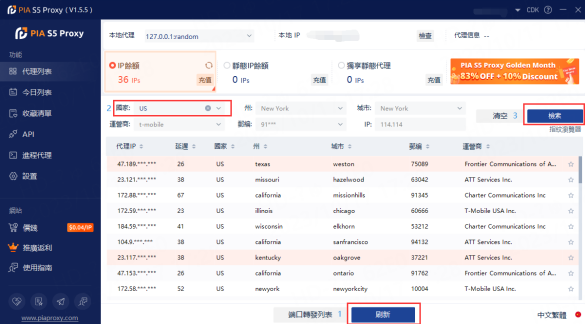
    image.png


   2. Right-click the forwarding list to the port and click Port Forwarding List
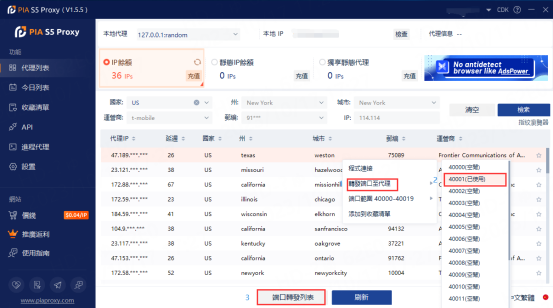
    image.png


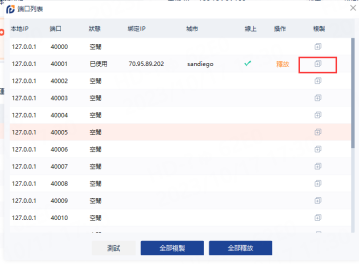
    3. Make a copy

     image.png


Three: Open the browser, click on the upper right corner, Settings
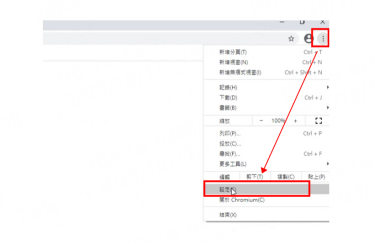
image.png


Four: Find the system and click proxy settings
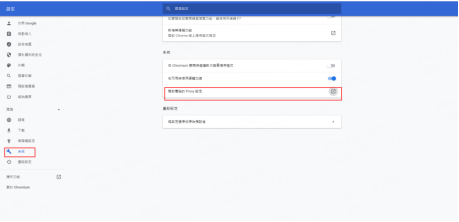

  image.png


Five: Click on the proxy switch, copy the previous IP and port, and save it
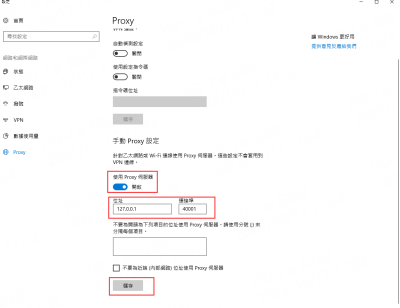
    image.png


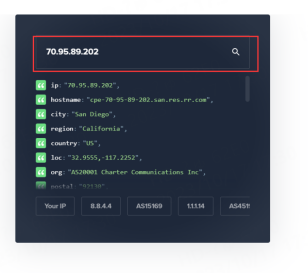
Six: Check whether the IP is correct

image.png


In this article: